3D Rendered Instagram Post Mockup
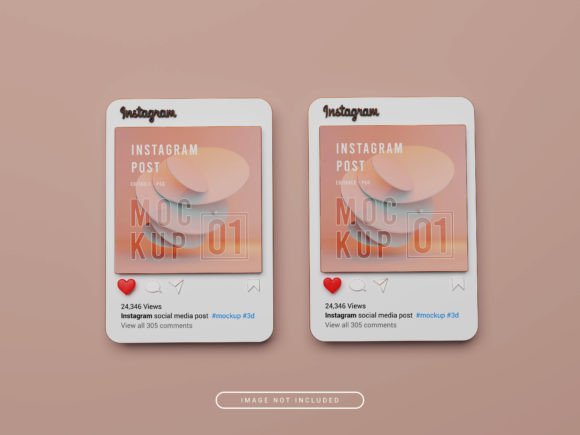
Creating eye-catching content for social media can be a challenge, especially when you want to showcase your designs in a realistic and professional way. A 3D rendered Instagram post mockup offers a powerful solution that helps you present your work with clarity and impact. These mockups are designed to give your audience a visual representation of how your design would look on an actual Instagram post, making it easier to communicate your ideas and attract potential clients.
Whether you're a designer, marketer, or small business owner, using a 3D rendered Instagram post mockup can elevate your online presence. It allows you to demonstrate your creative work in a format that’s both engaging and easy to understand. The mockups are versatile, making them ideal for promoting products, sharing portfolios, or even testing different design concepts before finalizing them.
What Makes 3D Rendered Instagram Post Mockups Useful?
One of the key benefits of 3D rendered Instagram post mockups is their simplicity and ease of use. These mockups are created in Adobe Photoshop and come as PSD files, which means they’re fully customizable. You don’t need advanced technical skills to use them—just a basic understanding of Photoshop is enough. This makes them accessible to a wide range of users, from beginners to professionals.
The high-quality resolution of these mockups ensures that your designs look sharp and clear, no matter where they’re displayed. With a resolution of 4000 x 3000 pixels and a 300 dpi setting, they’re perfect for both digital and print use. This level of detail helps maintain the integrity of your work, ensuring that your designs are presented in the best possible light.
How to Use 3D Rendered Instagram Post Mockups
Using a 3D rendered Instagram post mockup is straightforward. Start by opening the PSD file in Adobe Photoshop. Locate the smart object labeled “place your design here.” Double-click on this layer to open it in a new file. From there, simply drag and drop your design into the smart object. Once you’ve done that, save the file and return to the main PSD document to see your design integrated into the mockup.
This process is quick and efficient, allowing you to create professional-looking posts in minutes. The ability to customize the mockup means you can experiment with different layouts, color schemes, and design elements to find the best fit for your brand or project.
Creative Possibilities with 3D Rendered Instagram Post Mockups
These mockups open up a world of creative possibilities. For instance, if you’re a graphic designer, you can use them to showcase your latest logo or branding work. If you run an online store, you can create mockups that highlight your products in a visually appealing way. The versatility of these mockups makes them suitable for a variety of industries and applications.
You can also use them to test different design concepts before launching a campaign. By creating multiple versions of your post using the same mockup, you can compare how each design performs and choose the one that resonates most with your audience. This approach not only saves time but also helps you make more informed decisions about your content strategy.
Applications Across Different Industries
Marketing professionals can benefit from 3D rendered Instagram post mockups by creating compelling social media content that drives engagement. These mockups allow you to visualize how your message will appear on a user’s feed, helping you refine your approach and ensure your content aligns with your brand identity.
For educators and trainers, these mockups can be used to create instructional materials or presentations that are visually engaging. They can help illustrate complex concepts or provide a clear example of how a particular design or layout should look. This makes them a valuable tool for teaching and learning.
Entrepreneurs and small business owners can use these mockups to promote their products or services. Whether you’re launching a new product or showcasing your portfolio, a well-designed mockup can make a strong impression on potential customers. It’s an effective way to stand out in a crowded market and build trust with your audience.
Best Practices for Using 3D Rendered Instagram Post Mockups
To get the most out of your 3D rendered Instagram post mockups, it’s important to keep your designs clear and consistent. Use high-quality images and fonts that match your brand’s style. Avoid cluttering your mockups with too many elements, as this can distract from your main message.
Additionally, consider the platform where your content will be posted. Instagram has specific guidelines for image size and aspect ratio, so make sure your mockups are optimized for the platform. This ensures that your designs look their best and are easily recognizable to your audience.
Finally, don’t be afraid to experiment. Try different layouts, colors, and design elements to find what works best for your brand. The more you use these mockups, the more comfortable you’ll become with the process, and the more confident you’ll be in your ability to create impactful social media content.
Why Choose High-Quality Mockups?
Investing in high-quality 3D rendered Instagram post mockups is a smart choice for anyone looking to enhance their online presence. These mockups are not only visually appealing but also practical and easy to use. They provide a professional finish that can make a lasting impression on your audience.
With a 3D rendered Instagram post mockup, you can present your work in a way that’s both creative and functional. Whether you’re sharing your designs with clients, promoting your business, or testing new ideas, these mockups offer a reliable and effective solution. Their flexibility and quality make them a valuable asset for any creative professional or business owner.